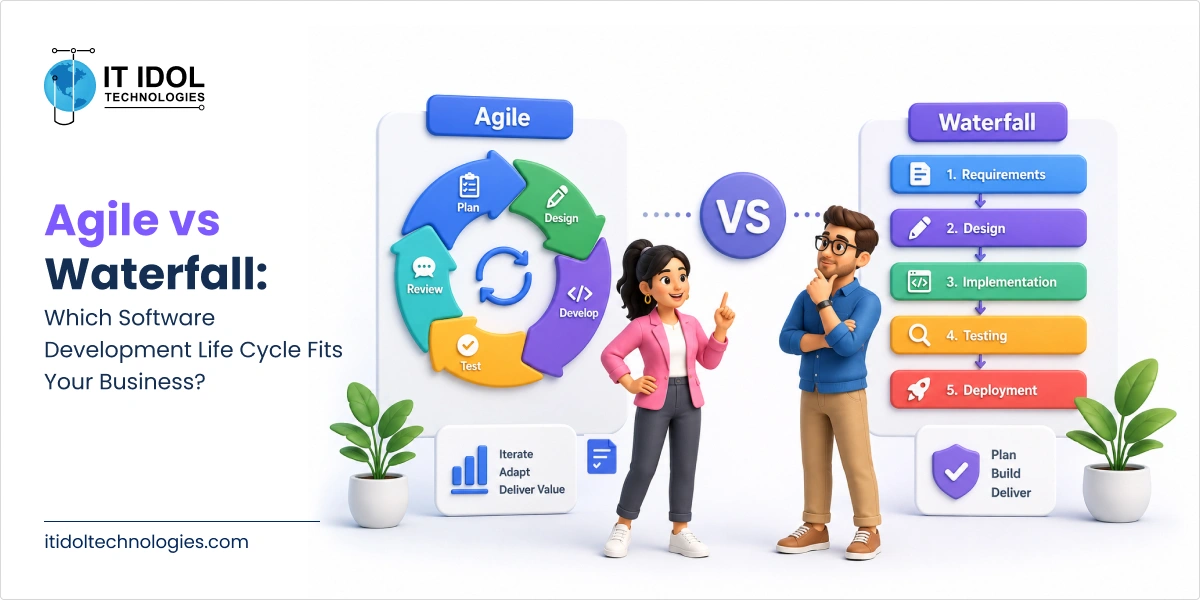
A complete SDLC checklist for enterprise software projects helps teams manage every stage of the software development lifecycle, from requirements gathering and architecture design to testing, deployment, and maintenance. Following a structured Software Development Life Cycle (SDLC) checklist reduces project risks, improves software quality, and minimizes costly rework by ensuring each phase is completed before moving to the next.
Introduction
Software development can take a long time, and sometimes it might get exhausting if not executed properly. It is important to execute the process in the most efficient manner for better and desired outputs. These complex software development projects might cost you without a solid framework, which might end up with undesired results for both the clients and developers. Turning an idea into a functional product requires addressing complex requirements, tight timelines, and user expectations.
It is advisable for every software development team to develop and go through a checklist to channelize the development process. Once created, executing the checklist starts with a better understanding of the software development life cycle. A proven framework helps the team with efficiency, consistency, and quality throughout the process.
In this article, we’ll explore why the SDLC is important, examine the stages of the software development lifecycle, and review the most common development models.
What is the software development life cycle(SDLC)?
The Software Development Life Cycle (SDLC) is a step-by-step process for building software. Instead of jumping straight into coding, teams follow a structured process from understanding what needs to be built and planning the project to developing, testing, launching, and maintaining it. This helps keep everyone aligned, reduces costly mistakes, and makes it much easier to deliver software that works as expected.
Why Most SDLC Checklists Miss Where Projects Actually Fail
Most Software Development Life Cycle (SDLC) checklists focus on whether tasks were completed, such as holding meetings, approving documents, or running tests.
However, they often miss a more important question: Did each phase provide the information the next phase actually needs?
This is where many software projects run into problems.
Consider a common example:
A project requirement says the CRM and order management system should have “real-time synchronization.”
The requirement gets approved, but no one defines what “real-time” actually means. Is it instant? Within a few seconds? Within a minute?
Since the requirement is unclear, the architecture team assumes a five-minute sync is acceptable because it works with the existing infrastructure.
A few months later, the sales team realizes the delay causes outdated inventory information, leading to incorrect customer quotes.
The project then requires expensive rework that could have been avoided with a clearer requirement from the beginning.
The issue wasn’t that anyone skipped a step.
Requirements were gathered.
Reviews were completed.
Approvals were given.
The real problem was that the requirement wasn’t specific or measurable, so the phase wasn’t truly complete even though it looked complete on paper.
That’s why an effective SDLC checklist should go beyond tracking completed tasks. It should confirm that every phase meets clear exit criteria and provides everything the next phase needs to move forward successfully.
The Enterprise SDLC at a Glance: Phase, Paper Deliverable, and Real Exit Criteria
Use this as a diagnostic. If your project can only point to the middle column for each phase, treat that as a warning sign, not a milestone.
Phase
What “Done” Looks Like on Paper
The Exit Criteria That Actually Matter
Requirements & Feasibility
Signed-off requirements document
Every requirement has a measurable, testable threshold (latency, volume, uptime)
Architecture & Design
Approved architecture diagram
Design is stress-tested against peak load and integration-failure scenarios, not just the happy path
Development
Code merged to main branch
Code meets agreed static-analysis and security thresholds before merge, not discovered after
Testing & QA
Test cases marked passed
Tests run against production-scale data and simulate third-party dependency failure
Deployment
Release pushed to production
Rollback has been executed in staging, not just documented in a runbook
Maintenance
Support process documented
Monitoring thresholds are tied to business impact, and each alert has a named owner
Phase 1: Requirements & Feasibility Checklist
This is the stage where the foundation of the project is built. Decisions made here have a bigger impact on the project’s cost, timeline, and success than almost any other phase. Yet, because teams are under pressure to move quickly, this step is often rushed.
Checklist
Define a clear business goal with a measurable outcome.
Example: Reduce the quote-to-cash process from 9 days to 3 days.
Avoid vague goals like Improve sales efficiency, because they can’t be measured or tested.
Make non-functional requirements specific.
Instead of saying the system should be fast or scalable, define expected response times, number of users, data growth, uptime, and other measurable targets.
Identify compliance and data requirements early.
Check whether the project must meet regulations such as the Digital Personal Data Protection Act (India), HIPAA, PCI DSS, or other industry-specific standards.
Confirm legal and compliance requirements before development begins.
Check feasibility from every angle.
Make sure the project is technically possible.
Verify that it can integrate with existing systems.
Confirm that it fits within the available budget.
Looking at all three together helps avoid costly surprises later.
Get clear approvals for individual requirements.
Instead of approving the entire document with one email, ensure each major requirement has an identified owner who has reviewed and approved it.
Why this phase is often rushed
Teams are usually under pressure to show quick progress with prototypes or designs.
Business stakeholders may not know how to define measurable technical requirements.
As a result, requirements stay vague, and the gaps only become visible later in the project when fixing them is much more expensive.
Phase 2: Architecture & Design Checklist
This phase is about making design decisions that will still work as the application grows. A good architecture helps the software handle future users, data, and business needs without major rework.
Checklist
Design the system for peak usage, not just normal traffic.
Think about the busiest days, such as sales events, month-end processing, or seasonal spikes, instead of average daily usage.
Clearly define how different systems will communicate.
Decide whether integrations should be synchronous or asynchronous, request-response or event-driven, and document why each approach was chosen.
Plan for future data growth.
Design the database and storage with the next 2–3 years in mind so they can handle increasing data without major changes later.
Build security into the design from the beginning.
Identify potential security risks early and include the necessary protections during the design phase instead of adding them after development.
Choose the right architecture for your project.
Whether it’s a monolith, modular monolith, or microservices, the decision should depend on your team’s size, project requirements, and deployment needs, not what’s currently popular.
Phase 3: Development Checklist
This phase focuses on writing reliable, maintainable code while preventing issues that become expensive to fix later.
Checklist
Run code quality and security checks continuously.
Perform static code analysis and dependency scans whenever code is committed or merged instead of waiting until just before release.
Follow a consistent code review process.
Reviews should check for things like error handling, test coverage, coding standards, and alignment with the project’s architecture—not just whether the code “looks good.”
Track technical debt.
If shortcuts are taken to meet deadlines, document them along with the reason and a plan to fix them later instead of letting them pile up unnoticed.
Use feature flags or gradual releases.
Deploy new code safely without immediately exposing every feature to users. This allows teams to test changes and quickly disable features if issues arise.
Testing isn’t just about checking whether a feature works. It’s also about making sure the software performs well under real-world conditions and can handle unexpected issues without failing.
Checklist
Test every feature against the agreed requirements.
Ensure the software behaves exactly as defined in the acceptance criteria, not based on assumptions.
Test performance under peak usage.
Verify that the application can handle the highest expected traffic and workload, not just normal daily usage.
Perform security testing.
Check for common vulnerabilities and security risks before the software goes live.
Test how the system handles failures.
Simulate issues like API failures, network outages, or service timeouts to ensure the application continues to work or fails gracefully.
Test data migration with realistic data.
Use production-sized, properly anonymized datasets to confirm data can be migrated accurately and efficiently.
Validate the software with real users.
Conduct User Acceptance Testing (UAT) using actual business scenarios to confirm the solution meets user needs.
Phase 5: Deployment Checklist
Deployment is more than releasing code. It should be planned carefully so new updates can be rolled out with minimal disruption and, if needed, rolled back quickly.
Configure monitoring and alerts so any issues can be detected immediately after deployment.
Inform stakeholders in advance.
Keep internal teams and affected users updated about the release schedule, expected changes, and support contacts.
Verify everything after deployment.
Run a quick production validation to confirm the application is working correctly in the live environment.
Phase 6: Maintenance & Post-Launch Checklist
Launching the software isn’t the end of the SDLC. Regular monitoring, updates, and improvements are essential to keep the application secure, reliable, and aligned with business needs.
Checklist
Monitor business-critical processes, not just system uptime.
Track whether important functions, such as user logins or checkout processes, are working as expected.
Assign ownership for alerts.
Every system alert should have a responsible person or team who can investigate and resolve the issue quickly.
Keep software and dependencies updated.
Follow a regular schedule for security patches and dependency updates instead of waiting until problems arise.
Collect feedback from support and operations teams.
Use customer issues and operational feedback to identify improvements and prioritize future development.
Review the architecture regularly.
Reassess the system as the business grows to ensure the architecture continues to meet current and future requirements.
SDLC Models Compared: Choosing the Right Fit for Enterprise Projects
The choice of SDLC model isn’t philosophical; it should follow directly from how well-understood your requirements are and how much regulatory or coordination overhead your organization carries.
Model
Best Fit When
Trade-off to Plan For
Waterfall
Requirements are stable and well understood; strict regulatory documentation is required
Expensive to change direction once development has started
Agile / Scrum
Requirements will evolve; fast feedback from users is available and valuable
Needs disciplined backlog and architecture governance or scope drifts
Hybrid (Agile + Stage-Gate)
Enterprise environment needs iterative delivery but also formal phase sign-off for compliance or budget approval
Requires more coordination overhead than pure Agile
DevOps-integrated SDLC
Frequent releases are a business requirement, and the organization can support continuous testing and monitoring
Demands mature automated testing and observability before it pays off
Common Mistakes That Can Derail an Enterprise SDLC Project
Even when teams follow every SDLC phase, small oversights can lead to delays, higher costs, or project failure. Here are some of the most common mistakes to avoid:
Treating documentation as a formality.
Documentation should be a practical resource that teams can refer to throughout the project, not something created just to meet compliance requirements.
Skipping architecture reviews.
Even if you’ve built a similar solution before, every project has different integrations, performance needs, and compliance requirements. Reviewing the architecture is still essential.
Testing with unrealistic data.
Testing with small or simplified datasets doesn’t reflect real-world conditions. Always test using production-like data and workloads.
Not having a process for handling changes.
Requirements often change during development. Without a clear change management process, projects can quickly suffer from scope creep, budget overruns, and missed deadlines.
Leaving security until the end.
Security should be considered throughout the project, not just before release. Finding vulnerabilities late makes them more expensive and time-consuming to fix.
Ignoring post-launch maintenance.
The work doesn’t stop after deployment. Regular updates, monitoring, and maintenance are necessary to keep the application secure, stable, and scalable.
Quick Self-Assessment: Is Your SDLC Checklist Actually Working?
Use these questions to evaluate whether your SDLC checklist is helping the project or simply being treated as a routine task.
Are all requirements clearly defined with measurable acceptance criteria?
Has the system been tested for real-world peak traffic instead of average usage?
Do you know how the application will behave if a critical third-party service or integration fails?
Has the rollback process been tested before deployment, or is it only documented?
Is there a clearly assigned owner responsible for monitoring alerts and responding to issues after the software goes live?
Final Thoughts
An SDLC checklist is only useful if teams actually use it to make decisions. If a phase doesn’t meet its exit criteria, there should be a process to pause, fix the issue, and move forward only when it’s ready, even if there’s pressure to stay on schedule.
The goal isn’t to complete every task on a checklist. It’s to ensure each phase delivers what the next phase needs, reducing the risk of costly rework, delays, and unexpected issues later in the project.
If you’d like an independent review of your SDLC process, architecture, or software delivery approach, IT IDOL Technologies can help identify potential gaps before they become expensive problems. Catching issues early is almost always faster, easier, and more cost-effective than fixing them after deployment.
Most enterprise SDLC frameworks include requirements and feasibility, architecture and design, development, testing and QA, deployment, and maintenance. The exact naming varies by framework, but the sequence of decisions is consistent across most enterprise projects.
SDLC describes the overall set of phases a software project moves through, from requirements to maintenance. Agile is a way of executing those phases iteratively, with shorter feedback cycles, rather than a separate life cycle. Agile projects still move through the same underlying SDLC phases — they just revisit them in shorter, repeated cycles instead of once, sequentially.
This varies too widely by project scope, industry, and regulatory requirements to give a reliable general figure. Rather than target a fixed duration per phase, it’s more reliable to define the exit criteria for each phase and let the timeline follow from how quickly those criteria can genuinely be met.
Quantifying non-functional requirements with specific numbers for latency, concurrent users, and data volume during the requirements phase is the step most frequently shortcut, because it requires technical and business stakeholders to align on details that are easy to leave vague under schedule pressure.
It depends on how stable the requirements are and how much regulatory documentation is required. Many enterprises use a hybrid model: Agile execution within formal stage-gates required for budget approval or compliance sign-off.
An exit criterion is a specific, measurable condition that must be met before a project is allowed to move from one phase to the next — for example, “all non-functional requirements have a quantified threshold” rather than “requirements gathering is complete.”
Frequently because QA was run against test data or load conditions that don’t reflect production. A system that passes every test case against a small, clean dataset can still fail under real transaction volume, real network conditions, or a real third-party outage.
Security works best as a continuous practice across every phase: threat modeling at design, static and dependency scanning during development, penetration testing before release rather than a single testing step near the end. Frameworks like the OWASP Top 10 are a useful reference point for common web application vulnerabilities.
In addition to the standard phases, regulated industries need documented compliance mapping (for example, to data protection law, healthcare regulations, or financial services requirements), audit trails for sign-offs, and data residency decisions made explicit at the architecture stage. Specific obligations should always be confirmed with legal or compliance counsel, since regulations are updated periodically.
Enterprise organizations generally benefit from revisiting their SDLC checklist and exit criteria at least annually, and after any project where a phase-gate failure caused a significant rework or delay, treating the checklist itself as a living document rather than a one-time template.
Deval Rathod
Founder & CEO
|
Deval Rathod is the Founder and CEO of IT IDOL Technologies, a custom software development company. With over a decade of experience in software engineering, solution architecture, and technology leadership, she has worked across custom software development, enterprise applications, AI & ML, and digital transformation. Her expertise includes guiding technology teams, designing scalable software solutions, and helping businesses evaluate and implement emerging technologies. She contributes insights on software engineering, artificial intelligence, enterprise technology, and digital transformation.